
Peeptown lets you log in with a one-time code sent to your email. This is useful if you do not want to enter a password or if you mainly use email verification for account access.
Step 1: Open the login page
Go to Peeptown Log In.
On the login screen, keep the Log in with OTP tab selected.
Step 2: Enter your email address
Type the email address connected to your Peeptown account.
Click Send Log In Code.
Step 3: Check your inbox
Peeptown sends a 6-digit code to your email address.
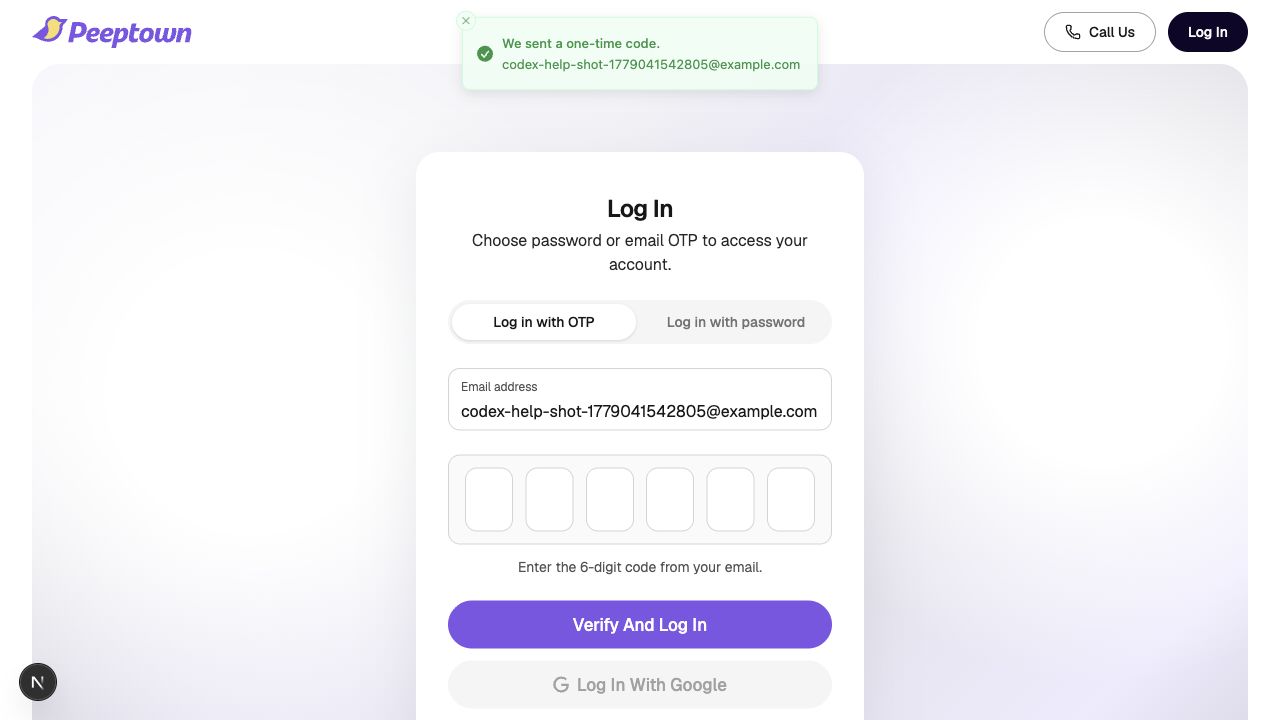
- Open the latest email from Peeptown.
- Copy the 6-digit code.
- Return to the login screen.
Step 4: Verify and log in
- Enter the 6-digit code in the code boxes.
- Click Verify And Log In.
If the code is correct, Peeptown signs you in right away.
If you need another code
- Click Resend Code.
- Use the newest code that arrives in your inbox.
- Check spam if the email is delayed.
When to use password login instead
If you prefer the usual email and password flow, switch to the Log in with password tab on the same page.
Related guide: How to Log In with Password on Peeptown.